
With this widget, you can display content in clean, modern cards that scroll smoothly on your page. Each card allows you to add an image, title, description, and a URL to link to another page or website.
This Rectangle Modern Scroll Cards widget is easy to use and perfect for showing services, features, or highlights in a neat and attractive way. It helps make your content more engaging while keeping the layout simple and organized.
Required Setup
- Elementor FREE Plugin installed & activated.
- You need to have the WDesignKit plugin installed and activated.
- Make sure you’ve created an account and logged into it.
- This is a pro widget. A valid WDesignKit Pro license is required to access and use them.
- Make sure you’ve downloaded the Rectangle Modern Scroll Cards widget.
How to Activate the Rectangle Modern Scroll Cards Widget?
Go to
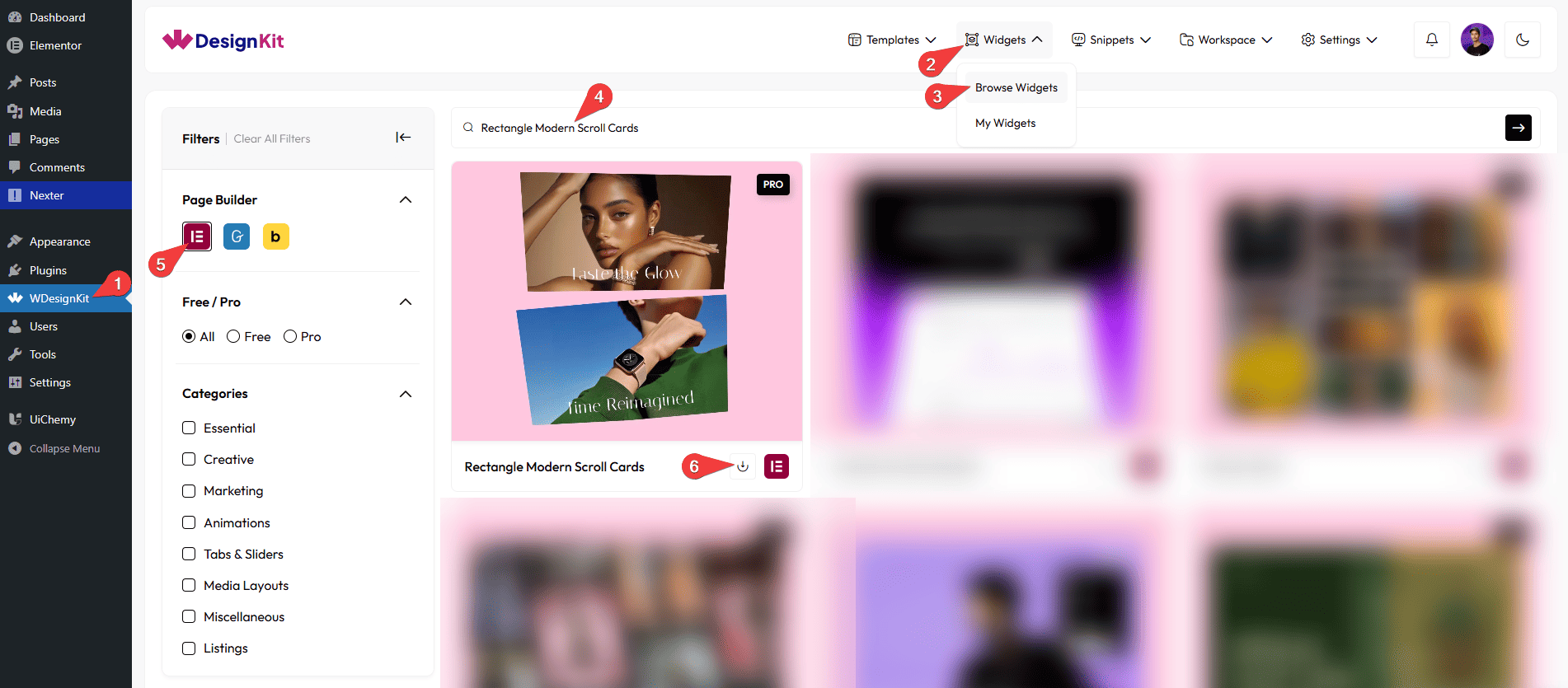
- WDesignKit →Widgets → Browse Widgets.
- Search the widget name and select Elementor as the Page Builder.
- Click on the Download icon.
Use Cases
Use this widget when you want to display content in modern, scrollable cards that look clean and engaging.
Best For:
- Showcasing Services or Features: Highlight your key offerings in an attractive, easy-to-read card layout.
- Portfolios & Projects: Display images, titles, and short descriptions of your work in a neat scrollable format.
- Landing Pages: Present important information or highlights in a compact, engaging way.
- E-commerce Websites: Show products, promotions, or categories in a visually appealing card style.
- Blog Highlights: Feature top posts with images and summaries to catch readers’ attention.
- Responsive Design: Perfect for mobile, tablet, and desktop screens with smooth scrolling.
- Interactive Content: Link each card to another page, product, or external URL for easy navigation.
- Modern Website Layouts: Keep your page clean and organized while presenting multiple items dynamically.
How to Use the Rectangle Modern Scroll Cards Widget in Elementor?
Add the Rectangle Modern Scroll Cards widget to the page.
Layout
You can select a pre-defined style from the Style dropdown.
Note : From this tab, based on the style you selected, you will see different options to add the content.
Content
From the Cards section, you can add the card items. By default, you’ll find three repeater items; open them.
From the Select Image field, you can choose the image or SVG Image for the card item.
In the Text field, you can add the text for the card item.
In the Description field, you can add a short description or details for the card item.
Note: The description will be displayed only in Style 2.
From the URL field, you can add a link that opens when the card item is clicked.
From the Title Color, you can set the color for the card’s title text.
From the Description Color, you can set the color for the card’s description text.
Note: The description will be displayed only in Style 2.
You can click on the + Add Item button to add more card items.
Then, from the Style tab, you can further customize the style of the Rectangle Modern Scroll Cards.