

How to See List of Previously Downloaded Templates?

Table of Contents

In the WDesignKit app, you have the convenience of accessing a list of previously downloaded templates, making it easy to manage and revisit your saved designs. This feature allows you to quickly locate and reuse templates that you have downloaded in the past.

To do so, login to your WDesignKit account in the app. and then go to Templates > Download.
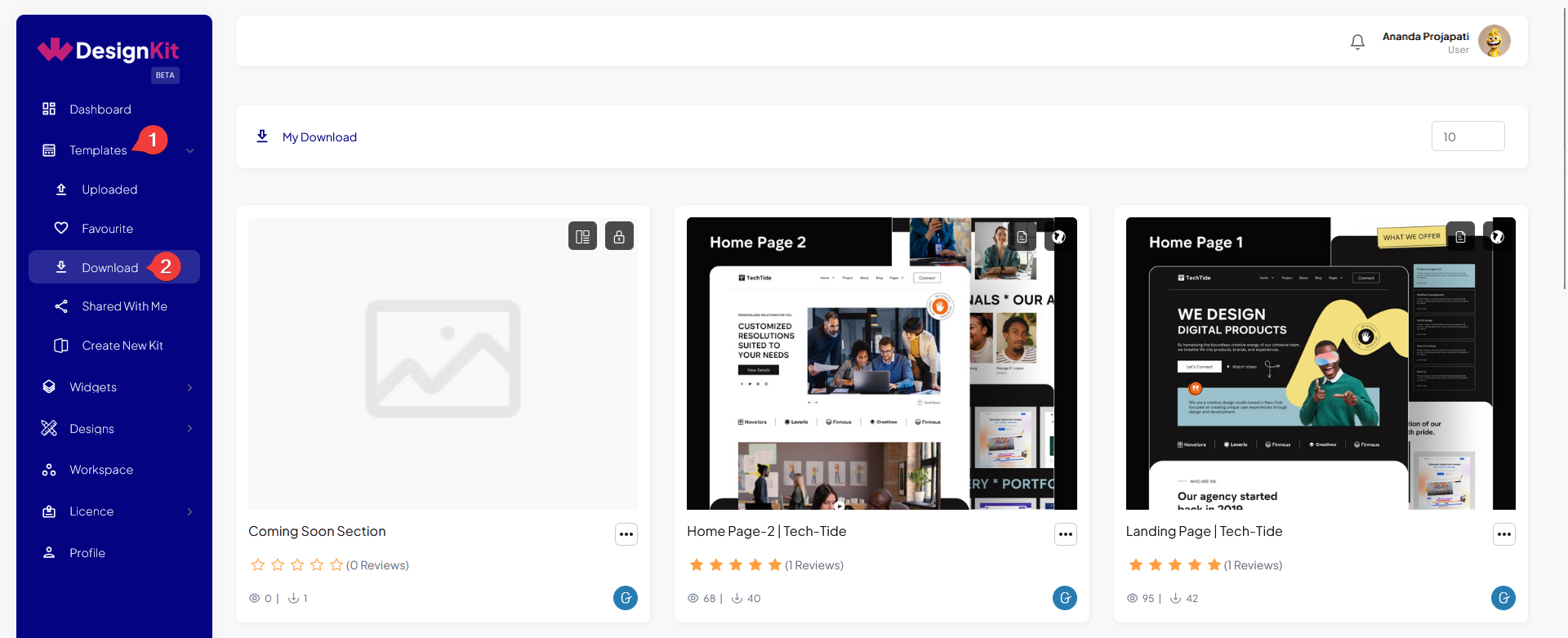
wdesignkit downloaded templates

Here you’ll see all the templates that you have downloaded in the past.

AUTHOR
Sagar Patel
CEO
icon
10+ Years Experience

Sagar is the Founder & CEO of POSIMYTH Innovations, with 10+ years building WordPress products trusted by 100,000+ websites globally. He has led the development of The Plus Addons for Elementor, Nexter, WDesignKit, and UiChemy, all built hands-on from concept to launch. His work focuses on making website building faster, more flexible, and accessible for creators and businesses worldwide.

Related Docs
docs

Docs Loop

docs

Docs Loop

docs

Docs Loop

docs

Docs Loop

docs

Docs Loop

docs

Docs Loop

docs

Docs Loop

docs

Docs Loop