

With this element, you can easily create eye-catching text animations that are triggered as users scroll through your page. It allows you to animate words and letters in a smooth and engaging way, helping you highlight important content and enhance the overall user experience. The On Scroll Letter Animation element is easy to customize and adds a modern, interactive touch to your website.
Required Setup
- Bricks Builder installed & activated.
- You need to have the WDesignKit plugin installed and activated.
- Make sure you’ve created an account and logged into it.
- Make sure you’ve downloaded the On Scroll Letter Animation element.
How to Activate the On Scroll Letter Animation Element?
Go to
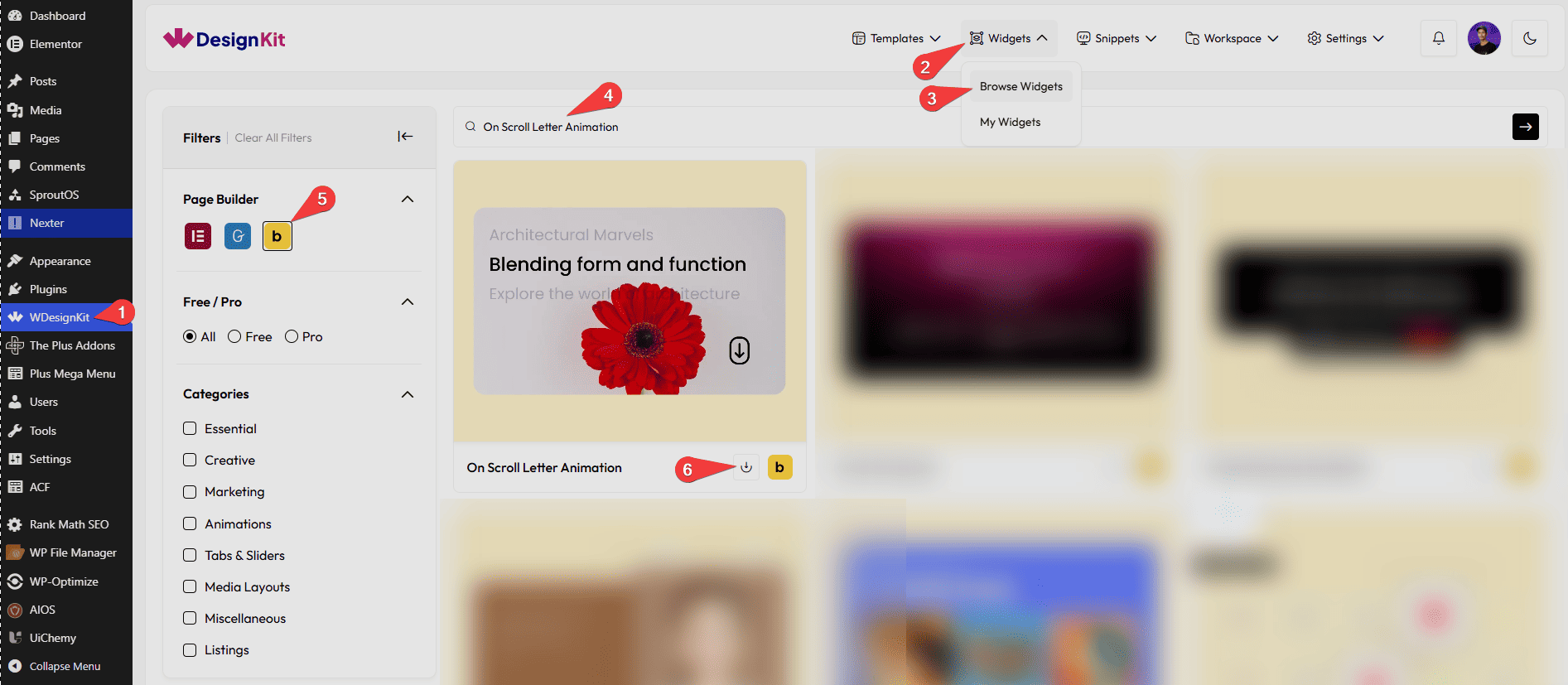
- WDesignKit → Widgets → Browse Widgets.
- Search the element name and select Bricks as the Page Builder.
- Click on the Download icon.
Use Cases
Use the On Scroll Letter Animation element to create engaging text animations that appear as users scroll through the page. It helps draw attention to important messages, improve visual storytelling, and create a modern browsing experience.
Best For:
- Hero Sections:Make headlines and key messages stand out with eye-catching scroll-triggered text animations.
- Landing Pages:Capture visitor attention and guide users through important content with animated text effects.
- Marketing Campaigns:Highlight promotional messages, offers, or brand statements in a visually engaging way.
- Storytelling Websites:Create immersive experiences by revealing text dynamically as users scroll through the content.
- Portfolio Websites:Showcase personal introductions, project titles, or creative statements with stylish animated text.
- Agency Websites:Present services, achievements, or company values with modern scrolling text animations.
- Product Launch Pages:Emphasize product features, benefits, or launch announcements through engaging text reveals.
- Branding & Identity Pages:Display brand messages, mission statements, or slogans in a memorable and interactive format.
- Creative Studios:Add visual interest to artistic, design-focused, or innovative website layouts.
- About Us Pages:Introduce company stories, team values, or business goals with animated text sections.
- Event & Conference Websites:Highlight event details, speaker announcements, or important updates with attention-grabbing animations.
- Educational Platforms:Present course information, learning objectives, or key educational messages in an engaging manner.
- Interactive User Experiences:Encourage visitors to explore page content by revealing text as they scroll.
- Modern Website Designs:Enhance contemporary website layouts with smooth and professional text animation effects.
- Content-Focused Websites:Break up large sections of text and improve readability with animated content presentation.
- User Engagement:Keep visitors engaged by adding movement and visual interest to important website content.
- Promotional Sections:Draw attention to special announcements, campaigns, or featured content with animated typography.
- Minimalist Designs:Add subtle visual effects without cluttering the page, maintaining a clean and elegant appearance.
- Creative Landing Pages:Improve the overall user experience by combining scroll interactions with animated text content.
- Professional Presentations:Showcase key messages, achievements, or business highlights in a polished and engaging format.
How to Use the On Scroll Letter Animation in Bricks?
Add the On Scroll Letter Animation element to the page.
LAYOUT
You can select a pre-defined animation style from the Style dropdown.
Note : From this tab, based on the style you selected, you will see different options to add the content.
CONTENT
In the Content field, enter the text you want to animate.
Then from the Style tab, you can further customize the style of the On Scroll Letter Animation.



