

With this element, you can show customer reviews in a rotating circular gallery. It is ideal for Marketing Pages, Product Pages, Landing Pages, Editorial layouts, Magazine-style layouts, Hero sections, and Portfolios.
Required Setup
- Bricks Builder installed & activated.
- You need to have the WDesignKit plugin installed and activated.
- Make sure you’ve created an account and logged into it.
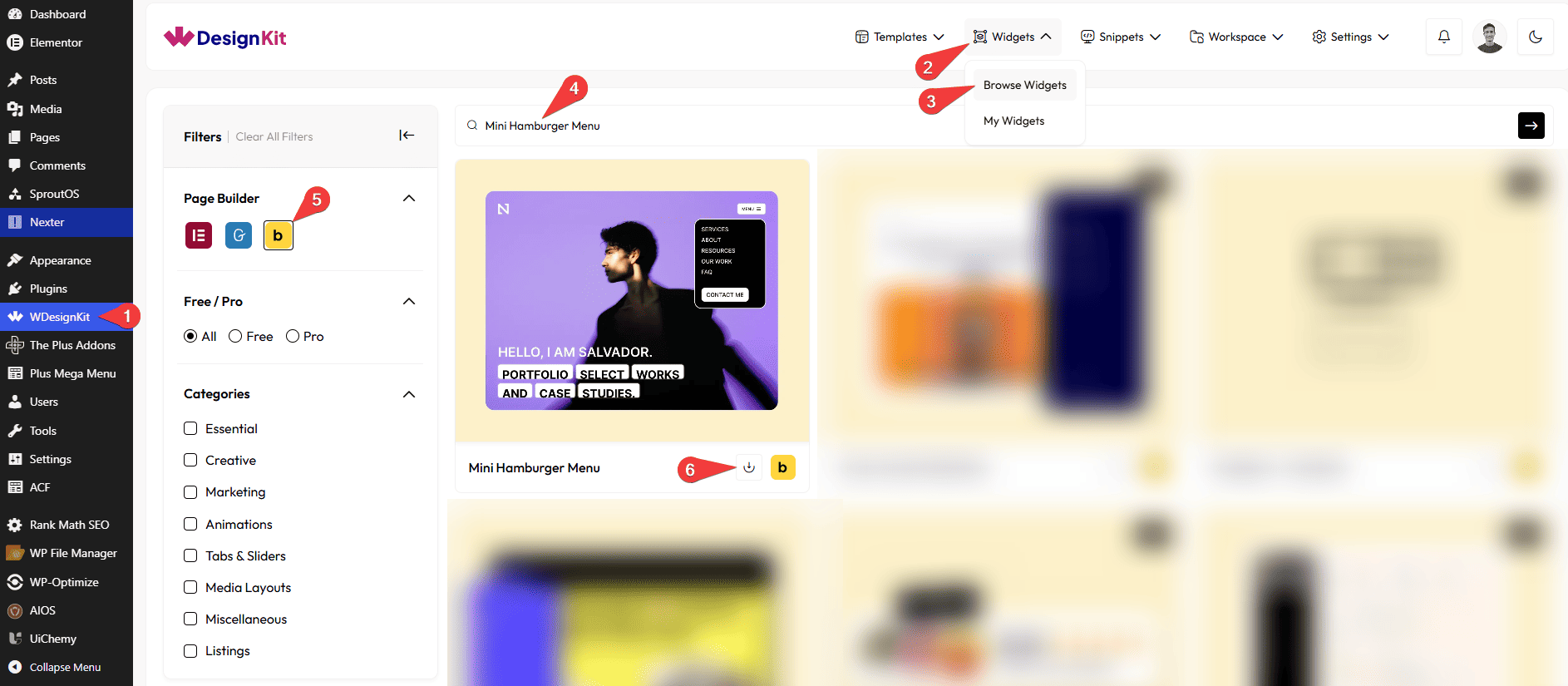
- Make sure you’ve downloaded the Mini Hamburger Menu element.
How to Activate the Mini Hamburger Menu Element?
Go to
- WDesignKit → Widgets → Browse Widgets.
- Search the element name and select Bricks as the Page Builder.
- Click on the Download icon.
Use Cases
Use this Mini Hamburger Menu when you want to add a compact, toggle-based navigation menu that keeps your layout clean while giving users quick access to important links and actions.
Best For:
- Mobile & Responsive Websites:Ideal for small screens where a hamburger menu helps save space and improves navigation on mobile and tablet devices.
- Minimal Website Layouts:Keep the page design uncluttered by hiding navigation and actions inside a compact menu.
- Landing Pages:Add simple navigation or key call-to-action buttons without distracting users from the main content.
- Portfolio Websites:Display menu links, social icons, and buttons in a clean and modern hamburger-style menu.
- Business & Corporate Websites: Include navigation links, contact buttons, and social profiles in a structured and easy-to-access menu.
- E-commerce Websites:Provide quick access to categories, account links, or promotional buttons using a compact menu.
- Social Media Access:Show social media icons inside the menu to guide users to your social profiles.
- Call-to-Action Driven Pages:Add buttons such as “Contact Us,” “Get a Quote,” or “Buy Now” inside the menu to drive user actions.
- Modern UI Designs:Perfect for websites aiming for a sleek, modern, and user-friendly navigation experience.
How to Use the Mini Hamburger Menu in Bricks?
Add the Mini Hamburger Menu element to the page.
LAYOUT
You can select a pre-defined style from the Style dropdown.
Note : From this tab, based on the style you selected, you will see different options to add the content.
You can choose a pre-defined animation style from the Style dropdown under the Icon heading.
Note: Based on the icon style you select, you will see different icons and related options.
MENUBAR
Under the Open Menu heading, in the Text field, you can add the text that appears on the button to open the menu.
Under the Close Menu heading, in the Text field, you can add the text that appears on the button to close the menu.
Note: Button text will work only when both the Open Menu and Close Menu texts are added.
CONTENT
From the Menu Items section, you can add the menu items. By default, you’ll find five repeater items, open it.
In the Text field, you can add the menu item text.
From the URL field, you can add a link that opens when the menu item is clicked.
By enabling the Open in new tab toggle, the attached URL will open in a new browser tab.
You can click on the + ADD ITEM button to add more items.
BUTTON
In the Text field, you can add the text that will appear on the button.
From the URL field, you can add a link that opens when the button is clicked.
By enabling the Open in new tab toggle, the attached URL will open in a new browser tab.
From the Select Icon option, you can choose an icon or SVG Icon to display on the button.
SOCIAL ICONS
By enabling the Social Icons toggle, you will see the Items section for your menu.
From the Items section, you can add the social icon items. By default, you’ll find three repeater items, open it.
From the Select Icon field, you can choose the social media icon you want to display.
From the URL field, you can add the link that opens when the social icon is clicked (for example, a social media profile link).
By enabling the Open in new tab toggle, the attached URL will open in a new browser tab.
You can click on the + ADD ITEM button to add more items.
Then from the Style tab, you can further customize the style of the Mini Hamburger Menu.



