

With this element, you can showcase your posts or content in a modern slider layout enhanced with stylish hover animations. When users hover over the posts, engaging transitions and visual effects instantly highlight the content, creating a more interactive browsing experience. This helps present your posts in an elegant and dynamic way while keeping the layout clean and professional.
Required Setup
- Bricks Builder installed & activated.
- You need to have the WDesignKit plugin installed and activated.
- Make sure you’ve created an account and logged into it.
- This is a pro element, so make sure you have the WDesignKit Pro license activated in your WDesignKit account.
- Make sure you’ve downloaded the Inline AJAX Search Bar element.
How to Activate the Inline AJAX Search Bar Element?
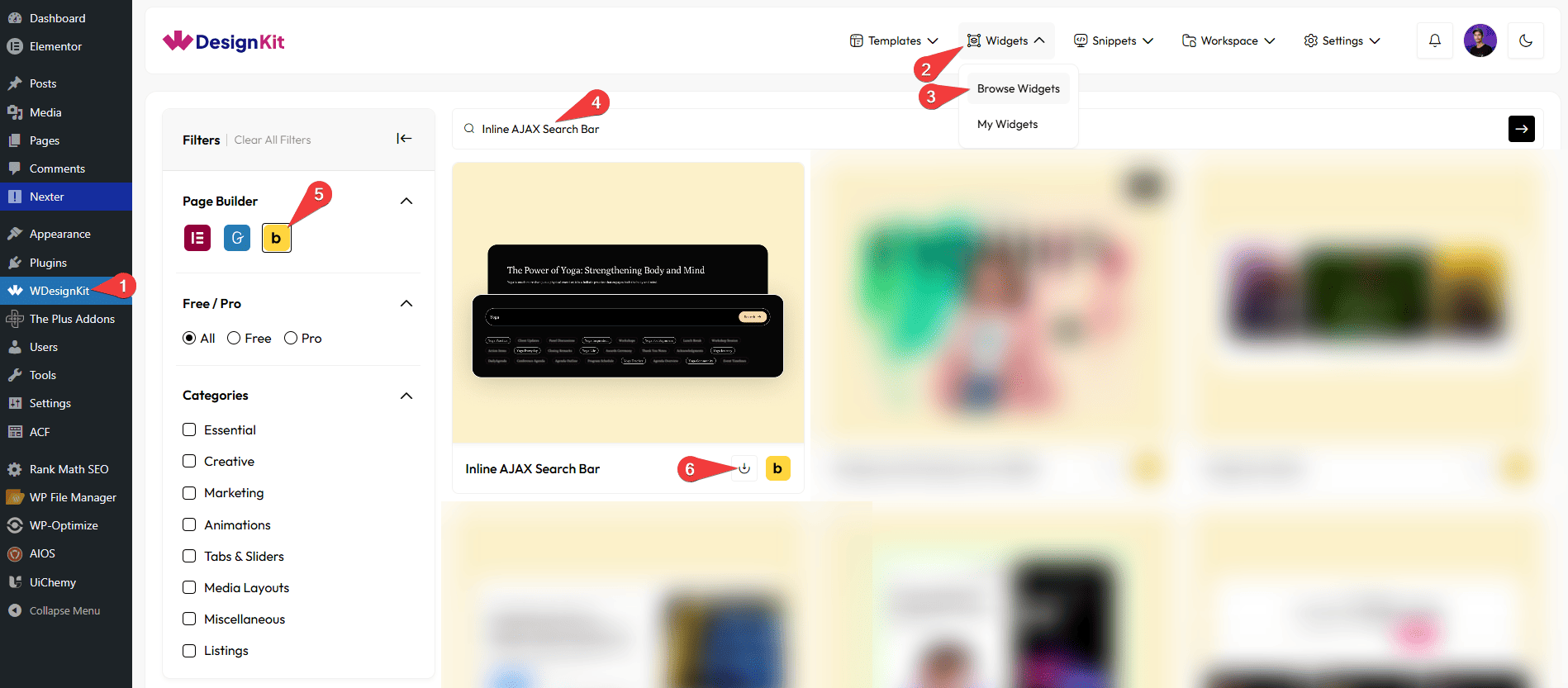
Go to
- WDesignKit → Widgets → Browse Widgets.
- Search the element name and select Bricks as the Page Builder.
- Click on the Download icon.
Use Cases
Use the Inline AJAX Search Bar when you want to help users quickly find content on your website without reloading the page. It provides instant search results as users type, making navigation faster and smoother. This improves user experience, saves time, and keeps visitors engaged.
Best For:
- Instant Content Search: Allow users to quickly search and find content in real time without a page refresh.
- E-commerce Websites: Help customers find products instantly, improving shopping experience and conversions.
- Blogs & Articles: Let readers easily search for posts, topics, or keywords as they type.
- Documentation & Help Centers: Enable users to quickly locate guides, FAQs, or support content.
- Portfolio Websites: Allow visitors to search through projects, case studies, or categories.
- Large Content Websites: Improve navigation for websites with lots of content by providing fast search results.
- App & Dashboard Interfaces: Enhance usability by adding quick search functionality within tools or dashboards.
- Educational Platforms: Help users find courses, lessons, or resources instantly.
- Directory & Listing Sites: Allow users to search listings like services, businesses, or profiles efficiently.
- Modern UI Design: Perfect for creating a clean, fast, and interactive search experience.
How to Use the Inline AJAX Search Bar Element in Bricks?
Add the Inline AJAX Search Bar element to the page.
CONNECTION
In the Connection ID field, you have to add the container CSS ID, where the element is added; in our case, it will be “search-con”.
Then, in the Target ClassName field, you have to add the common CSS class name of the element you want to search for content from.
Note: you can add multiple class names by separating them with a space.Example: class1 class2 class3
CONTENT
In the Placeholder Text field, you can add a placeholder text to the search field.
You can add an icon to the search bar by enabling the Prefix Icon toggle.
From the Select Icon section, you can select either an icon or an SVG for the search bar.
EXTRA OPTIONS
From the Results dropdown, you can select when to show the search result. Here you’ll find two options –
- On Input Change – To show the search result as you type.
- On Button Click – To show the search result, on a button click.
When the On Button Click option is selected, you can change the button text, button icon, and icon position.
From the Focus Animation dropdown, you can add different mouse focus animations to the search field. Here you’ll find three options –
- None – To add no animation.
- Border – To add a border animation on focus.
- Background – To add a background animation on focus.
You can add an icon to the search bar by enabling the Prefix Icon toggle.
Then, from the Style tab, you can further customize the style of the Inline AJAX Search Bar.
Now, when you search for anything in the search bar, it will highlight the matching texts by blurring the unmatched texts.



