

This block adds a rainbow color drop shadow effect to your button, making it more vibrant and eye-catching. It helps grab users’ attention and enhance engagement.
Required Setup
- Nexter Blocks FREE Plugin installed & activated.
- You need to have the WDesignKit plugin installed and activated.
- Make sure you’ve created an account and logged into it.
- Make sure you’ve downloaded the Rainbow Button block.
How to Activate the Rainbow Button Block?
Go to
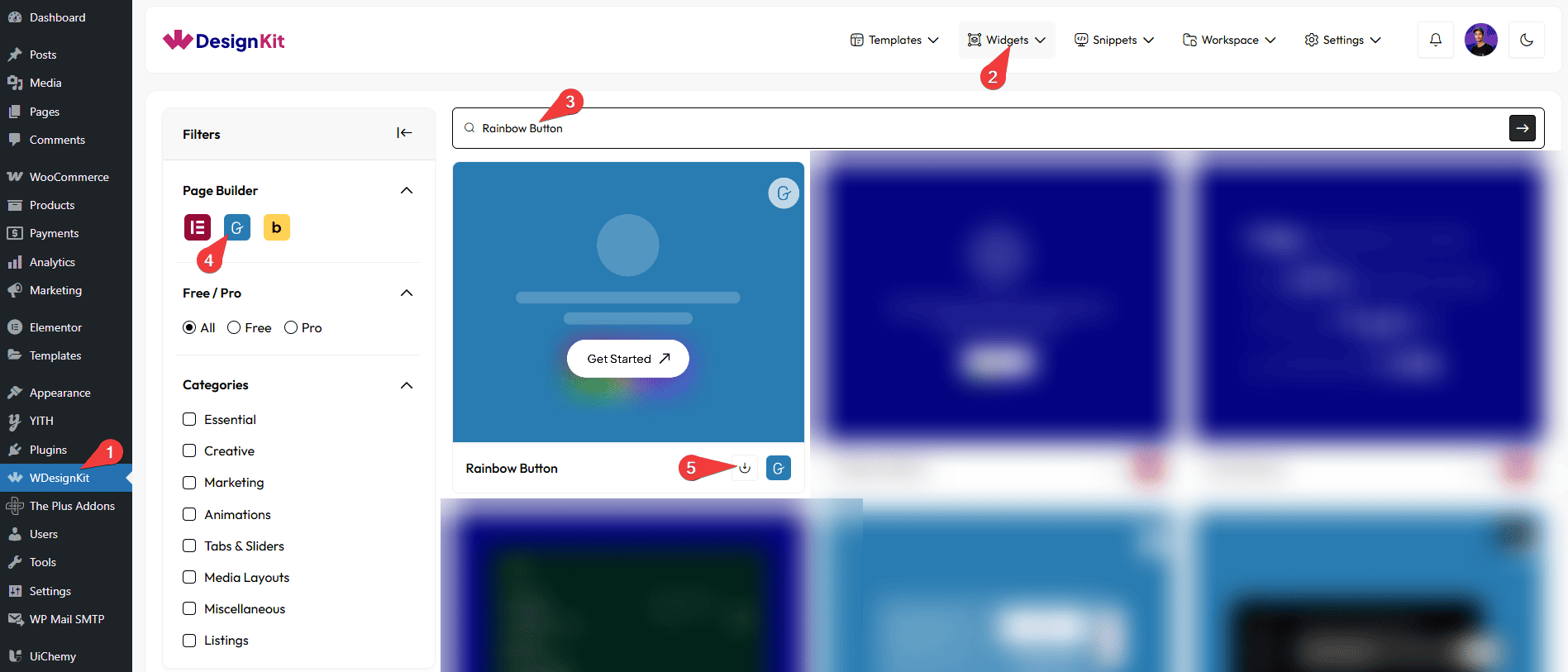
- WDesignKit → Widgets.
- Search the block name and select Gutenberg as the Page Builder.
- Click on the Download icon.
How to Use the Rainbow Button Block in WordPress?
Add the Rainbow Button block to the page.
Content
In the Button Text section, you can add text to the button.
Then, in the URL section, you can add the button URL.
You can add an icon or SVG to the button from the Select Icon section.
Extra Options
Then, from the Alignment section, you can align the button for responsive devices.
Then, from the Style tab, you can further customize the style of the Rainbow Button.



