

With this element, you can easily create visually engaging sections with smooth parallax scrolling effects. It allows you to display images, text, or media in multiple slides, where background and foreground elements move at different speeds as users scroll or swipe. The Parallax Scroll Portfolio widget is easy to customize and helps you build modern, clean, and immersive layouts for portfolios, landing pages, hero sections, or product showcases.
Required Setup
- Bricks Builder installed & activated.
- You need to have the WDesignKit plugin installed and activated.
- Make sure you’ve created an account and logged into it.
- This is a pro element, so make sure you have the WDesignKit Pro license activated in your WDesignKit account.
- Make sure you’ve downloaded the Parallax Scroll Portfolio element.
How to Activate the Parallax Scroll Portfolio Element?
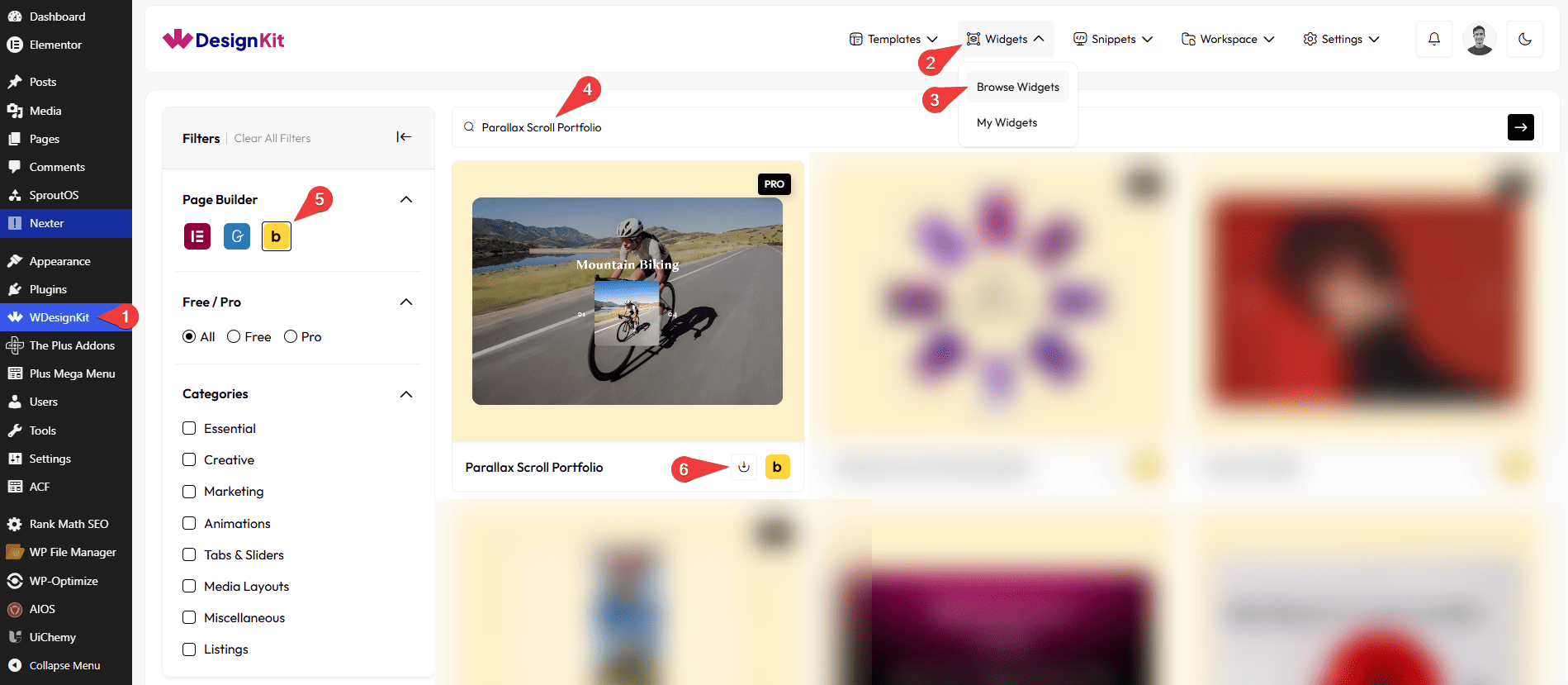
Go to
- WDesignKit → Widgets → Browse Widgets.
- Search the element name and select Bricks as the Page Builder.
- Click on the Download icon.
Use Cases
Use this Parallax Scroll Portfolio when you want to create visually rich sections with smooth parallax scrolling that feel modern and interactive without using heavy sliders or galleries.
Best For:
- Product Showcases:Highlight products with parallax effects that add depth and make them look premium and engaging.
- Portfolio Websites:Perfect for designers, photographers, and creatives who want to showcase their work in a smooth, scroll-based layout.
- Photography & Visual Projects:Present images in an immersive way where layers move at different speeds as users scroll.
- Landing Pages:Grab attention quickly with eye-catching parallax sections that guide users through content.
- Hero Sections:Create impactful hero areas with layered visuals and smooth scrolling effects.
- Brand Story Sections:Tell your brand story visually by combining images and text with motion and depth.
- Marketing Websites:Add interactive and dynamic visuals to campaigns, promotions, or featured content.
- Case Studies & Showcases:Show progress, highlights, or results in a clear and engaging scroll experience.
- User Engagement Enhancement:Parallax motion encourages users to scroll and explore the content.
- Modern & Design-Focused Websites:Best suited for websites that want clean, stylish, and immersive scrolling experiences.
How to Use the Parallax Scroll Portfolio in Bricks?
Add the Parallax Scroll Portfolio element to the page.
CONTENT
From the Slides section, you can add the image items. By default, you’ll find four repeater items, open it.
From the Select Image section, you can choose an image for the portfolio item.
In the Title field, you can add the title of the portfolio item.
In the Counter 1 field, you can add the first counter value for the portfolio item.
In the Counter 2 field, you can add the second counter value for the portfolio item.
In the URL field, you can add a link to the portfolio item that opens when the portfolio item is clicked.
By enabling the Open in new tab toggle, the attached URL will open in a new browser tab.
You can click on the + ADD ITEM button to add more items.
Then from the Style tab, you can further customize the style of the Parallax Scroll Portfolio.



